
The music ADdes writes while it dreams
ADdes has no playlist and no loops. A soundtrack engine inside the app composes slow ambient music as it plays, in a key and a room that follow the Feel on screen.
Seven recordings from the app
The engine has eight moods, called Audio Feels. Seven are here, about 45 seconds each, recorded straight from the app. The eighth, Visualizer, has no recording yet. The key named for each one is its home: the harmony wanders, and keeps coming back to it. Nothing plays until you press play.
- Deep TideD Dorian, 50 to 54 beats a minute. Home to Bioluminescent Sea, Deep Trance and Mycelium, with the darkest pads of the eight.
- CathedralF Lydian, 48 to 52 beats a minute, the slowest. Home to Cathedral of Light and Aurora.
- EmberA Aeolian, the natural minor, 55 to 59 beats a minute. Home to Ember Temple and Flame Tunnel.
- GlasshouseC Ionian, the plain major scale, 58 to 62 beats a minute. The brightest pads, and bell sparkles more often than anywhere else. Home to Silk Threads, Prism Bloom and Kaleidoscope.
- StarfieldE Mixolydian, 52 to 56 beats a minute. Home to Starlight Orbits and Voyage.
- Neon NightG Dorian, 60 to 64 beats a minute, the quickest. Arpeggios come round most often here. Home to the Neon and Psychedelic Hallways and Electric Sheep '99.
- WormholeE flat Lydian, 56 to 60 beats a minute. It favours chords stacked in fourths over plain triads. Home to the Wormhole Hallway and Trance Tunnel.
How the engine composes
Every note is generated live, and nothing in the built-in soundtrack is a recorded loop. These are the parts you hear.
- Harmony
- The chords change one note at a time, walking toward the home key of the Audio Feel. When the Feel changes, the music does not cut over. It walks to the new key the same way.
- Pads
- Slow, soft chords. Each pad voice moves on its own timer, so they never all change at once. The colours of the dream on screen shape their tone.
- Drone and sub
- A low held note under everything, with a detuned sub beneath it.
- Arpeggios and sparkles
- Now and then an FM arpeggio plays a short phrase, or a few bell notes glint. Both pass through a ping-pong echo that bounces between your ears.
- Tempo
- A slow pulse that wanders inside the Audio Feel's range. Across all eight, the music stays between 48 and 66 beats a minute.
- A room for each Audio Feel
- One reverb with eight rooms, each with its own decay, damping and early reflections. When the Feel changes, the rooms crossfade over about 20 seconds, with no slide in pitch.
Every choice comes from a seeded generator, so the same seed plays the same music again.
Each Feel has a home sound, and you can choose another
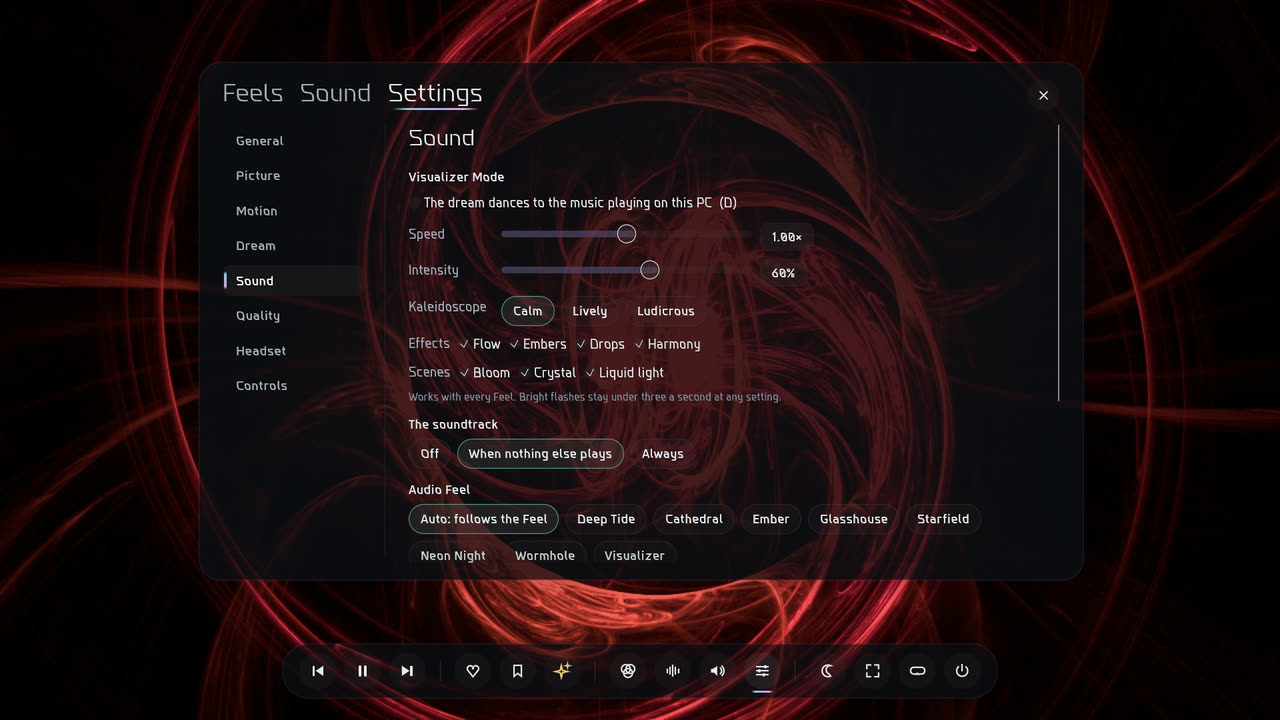
Left on Auto, the soundtrack follows the Feel on screen: Aurora plays Cathedral, a Voyage plays Starfield. In the Sound section of Settings you can pick one of the eight Audio Feels to keep, whatever is on screen.
The same section sets when the soundtrack plays: Off, When nothing else plays, or Always. It starts on When nothing else plays, so it steps aside for your own music. There are level sliders for the Pads, Arpeggios and Sparkles.
| Control | What it does |
|---|---|
| M | mute or unmute the soundtrack |
| + / - | soundtrack volume |
--mute | start with no soundtrack |
The sound opens as shapes pass you
On a Voyage the drone is muffled between passes (a low-pass near 580 Hz). As a shape passes, the filter opens wide and the drone's voices brighten. It follows the nearest shape, so each close pass is its own event. Behind you it closes again, so a shape that has gone by sounds darker than one the same distance ahead.
Each shape also carries a soft whoosh of air that pans with it and drops in pitch as it goes by (a Doppler shift, exaggerated so it can be heard). In a hallway the same thing happens at every frame you pass through.
Make new sounds in ADdes Studio
Ambient Studio on the title screen opens ADdes Studio, where you can write new arpeggios and sparkles for the soundtrack. It runs the app's own sound engine, with the same voices, echo and rooms, so what you hear there is what ADdes will play. You can build a sound from an FM tone or a bell, or bring in a recording of your own (WAV, OGG, MP3 or FLAC), then save them as a pack. A chill meter compares each idea with the app's own sounds and warns you when it would be harsh on the ear.
Hear the drone
This is a small sketch of the drone layer, built from your browser's own oscillators. The recordings above are the real thing. Pick a mood and press Listen. Nothing plays until you do, and the sound arrives slowly.
The drone needs JavaScript and Web Audio, and one of them is off here. Everything else on this page reads without them.
Silent. Press Listen to begin.
The slider stops at the loudest setting the offline test checked.
Voice:
- Root
- Voicing
- Voices
This is a sketch for the web, not the app's synth, and it has none of the walking harmony or the arpeggios. The oscillators, filters and reverb are your browser's, so it sounds related to the app, not the same. It never uses your microphone, and it does not listen to your music.
Hold still pauses the picture only. The sound has its own Stop, always in view. A gentle limiter and a soft ceiling keep every peak under -1 dBFS.
Eight ribbons: the drone's sound split into eight bands, low to high. They take the voice's colours, and they never move fast.
The picture is held still. The sound goes on; press Stop to end it.
How the sketch turns a mood into a voice
- The root comes from the palette's mean hue, walked round the circle of fifths and kept low, between 55 and 82 Hz. The wheel shows where this voice lands.
- Bright moods (Dawn, Ember, Prism, Aurora) get open fifths, an octave, a ninth and a Lydian sharp eleventh.
- Every other mood gets a dusk voicing: fifths with a minor third and a minor seventh.
- The voicing glides when the mood changes. Change it while the drone plays and listen.
- The seed chooses how many voices you hear, up to six, and what each is made of. The same seed always gives the same voice.
When you play your own music
ADdes can hear whatever else is playing on the PC. It captures other apps' audio with Windows process loopback, which leaves out ADdes itself, so it hears your music and never its own. It analyses the sound on your machine and never plays it back or sends it anywhere. Process loopback needs Windows build 20348 or newer.
In the ordinary dreams, music is only allowed to tint the picture, slowly. For a dream that dances to the song, turn on Visualizer Mode, which has its own page and its own limits.
- Slow in, slower out
- A change driven by music takes at least 250 ms to rise and at least 1.5 s to fall.
- Shallow
- Depth is capped at about 10 to 15% of each setting, up or down.
- No flashes from beats
- With Visualizer Mode off, a beat never triggers a flash or a jump.
The chart needs JavaScript. It draws a made-up 128 BPM beat as sharp spikes, and under it the dream's response as one slow swell that stays inside the cap.
This chart is an illustration of the rule, not a recording. The beat is made up, and the curve is drawn through the rule's limits, not through the app's code. In the app the rule is tested against a synthetic 128 BPM beat, the worst case: at most 5% of the movement in any music-driven setting may be faster than 2 Hz.
The screensaver is silent
Run as your Windows screensaver, ADdes covers every monitor with no overlay and makes no sound at all, so it cannot wake a sleeping house.
Get ADdes. Coming soon.